ip
Duck User Guide
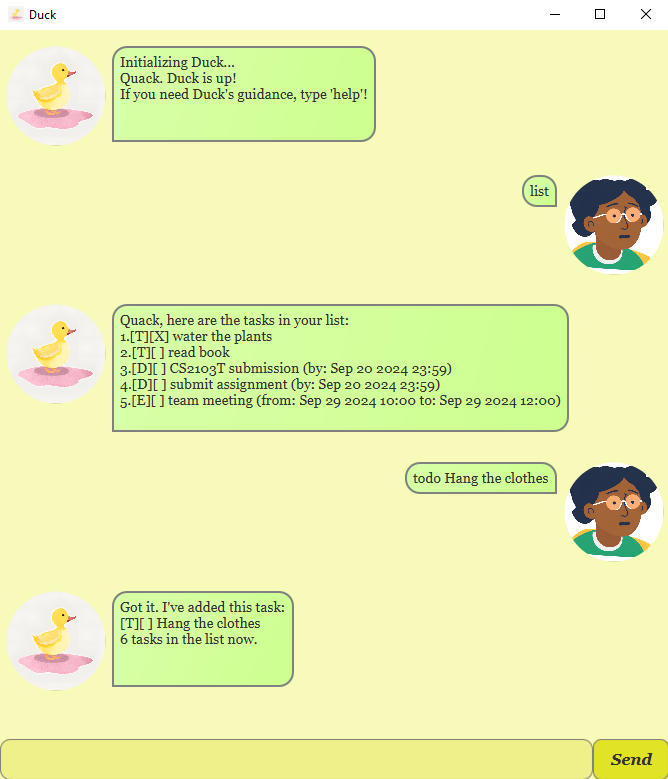
Duck is a personal assistant application for managing tasks. It allows you to keep track of to-do lists, deadlines, and events through simple text commands. Duck supports a range of commands to help you manage and sort your tasks effectively, and can also save and load your tasks from a file.
Notes about command format:
-
Words in
UPPER_CASEare the parameters to be supplied by the user.
e.g., intodo DESCRIPTION,DESCRIPTIONis a parameter that can be used astodo read book. -
Extraneous parameters for commands that do not take in parameters (such as
listandbye) will be ignored.
e.g., if the command specifieslist 123, Duck will still execute thelistcommand.
Getting help with commands: help
The help command provides a list of all available commands and their descriptions. This can help you learn how to use Duck effectively.
Format: help
Expected outcome
Quack! Seems like you need Duck's help.
Here are the commands you can use:
1. todo <description> - Add a todo task
2. deadline <description> /by <date> - Add a deadline task
3. event <description> /from <date> /to <date> - Add an event task
4. list - List all tasks
5. sort /target <target> /by <criterion> - Sort target tasks by the criterion
6. mark <task number> - Mark a task as done
7. unmark <task number> - Mark a task as incomplete
8. delete <task number> - Delete a task
9. find <keyword> - Find tasks with a keyword
10. on <date> - List tasks due on a specific date
11. bye - Exit the application
12. help - Show this help message
Listing all tasks: list
The list command allows you to view all tasks currently stored in Duck’s task list, including to-do items, deadlines, and events.
Format: list
Expected outcome
Quack, here are the tasks in your list:
1. [T][ ] read book
2. [D][ ] submit assignment (by: Sep 30 2024 23:59)
3. [E][ ] team meeting (from: Sep 29 2024 10:00 to: Sep 29 2024 12:00)
Adding to-do tasks: todo
The todo command allows you to add basic to-do tasks to your list. These tasks do not have a deadline or time constraints but are tasks that need to be completed.
Format: todo DESCRIPTION
DESCRIPTIONis the description of the task you want to add.
Example:
todo read book
- This command adds a new to-do task called “read book” to your task list.
Expected outcome
Got it. I've added this task:
[T][ ] read book
4 tasks in the list now.
Adding deadlines: deadline
The deadline command allows you to add tasks with a deadline to your task list. You can specify the task description, followed by the /by keyword and the deadline.
Format: deadline DESCRIPTION /by DATE
DESCRIPTIONis the description of the task you want to add.DATEis the deadline for the task in the formatYYYY-MM-DD HHMMorYYYY/MM/DD HHMM.
Example: deadline submit assignment /by 2024-09-30 2359
- This command adds a new deadline task called “submit assignment” with a deadline of September 30, 2024, at 11:59 PM.
expected output
Got it. I've added this task:
[D][ ] submit assignment (by: Sep 30 2024 23:59)
5 tasks in the list now.
Adding events: event
The event command allows you to add an event to your task list. You can specify a description, a start time (using the /from keyword), and an end time (using the /to keyword).
Format: event DESCRIPTION /from START_DATE /to END_DATE
DESCRIPTIONis the description of the event you want to add.START_DATEis the start date and time of the event in the formatYYYY-MM-DD HHMMorYYYY/MM/DD HHMM.END_DATEis the end date and time of the event in the formatYYYY-MM-DD HHMMorYYYY/MM/DD HHMM.
Example:
event team meeting /from 2024-09-29 10:00 /to 2024-09-29 12:00
- This command adds a new event called “team meeting” scheduled from 10:00 AM to 12:00 PM on September 29, 2024.
Expected outcome:
Got it. I've added this task:
[E][ ] team meeting (from: Sep 29 2024 10:00 to: Sep 29 2024 12:00)
6 tasks in the list now.
Marking tasks as done: mark
Duck allows you to mark tasks as completed using the mark command. This updates the status of a task in your list.
Format: mark INDEX
INDEXis the index of the task you want to mark as done.Note: The index starts from 1, not 0.Example:
mark 2- This command marks the second task in your list as completed.
Expected outcome:
Nice! I've marked this task as done:
[D][X] CS2103T submission (by: Sep 30 2024 23:59)
Marking tasks as not done: unmark
The unmark command allows you to mark tasks as not done.
Format: unmark INDEX
INDEXis the index of the task you want to mark as not done.Note: The index starts from 1, not 0.Example:
unmark 1- This command marks the second task in the list as not done.
Expected outcome:
OK, I've marked this task as not done yet:
[T][ ] read book
Deleting tasks: delete
You can remove tasks from your list using the delete command.
Format: delete INDEX
INDEXis the index of the task you want to delete.Note: The index starts from 1, not 0.Example:
delete 3- This command deletes the third task from the list.
Expected outcome:
Noted. I've removed this task:
[T][X] water the plants
4 tasks in the list now.
Finding tasks by keyword: find
The find command allows you to search for tasks containing a specific keyword.
Format: find KEYWORD
KEYWORDis the word you want to search for in your tasks.
Example:
find assignment
- This command lists all tasks that contain the keyword “assignment”.
Expected outcome:
Quack, I found these related tasks for you!
1. [D][ ] submit assignment (by: Sep 30 2024 23:59)
Sorting tasks: sort
Duck supports sorting your tasks with the sort command. You can specify different criteria for sorting.
Format: sort /target TARGET /by CRITERION
TARGETis the target tasks you want to sort (e.g., all, todo, deadline, event).CRITERIONis the criterion you want to sort by (e.g., type, description, deadline, start, end).
Example:
sort /target all /by type
- This command sorts all the tasks with deadlines in your list, in chronological order.
Expected outcome:
all tasks sorted successfully by type!
Previous list
Quack, here are the tasks in your list:
1. [T][ ] read book
2. [D][ ] submit assignment (by: Sep 30 2024 23:59)
3. [E][ ] team meeting (from: Sep 29 2024 10:00 to: Sep 29 2024 12:00)
4. [D][ ] CS2103T submission (by: Sep 30 2024 23:59)
5. [T][X] water the plants
List after sorting
Quack, here are the tasks in your list:
1. [T][ ] read book
2. [T][X] water the plants
3. [D][ ] CS2103T submission (by: Sep 30 2024 23:59)
4. [D][ ] submit assignment (by: Sep 30 2024 23:59)
5. [E][ ] team meeting (from: Sep 29 2024 10:00 to: Sep 29 2024 12:00)
Exiting the application: bye
You can exit Duck by using the bye command.
Format:
bye
Expected outcome:
Quack! Duck is going to sleep now. Goodbye!
Saving the data
There is no need to save the data manually. Duck automatically saves your tasks to a file named duck.txt in a folder named data, in the user’s home directory.
The data will be loaded automatically the next time you run Duck.
Editing the data file
Duck data are saved automatically as a txt file in the data folder of the user’s home directory. Advanced users can edit the data file directly to make changes to the tasks.
For Windows: C:\Users\<username>\data\duck.txt
For Mac: /Users/<username>/data/duck.txt
For Linux: /home/<username>/data/duck.txt
Caution: Editing the data file directly with invalid formats may cause Duck to behave unexpectedly.
Duck will only load the lines of data that are in the correct format.
Command Summary
| Action | Format, Example |
|---|---|
| Help | help |
| List | list |
| Todo | todo DESCRIPTION e.g., todo read book |
| Deadline | deadline DESCRIPTION /by DATE e.g., deadline submit assignment /by 2024-09-30 2359 |
| Event | event DESCRIPTION /from START_DATE /to END_DATE e.g., event team meeting /from 2024-09-29 10:00 /to 2024-09-29 12:00 |
| Mark | mark INDEX e.g., mark 2 |
| Unmark | unmark INDEX e.g., unmark 1 |
| Delete | delete INDEX e.g., delete 3 |
| Find | find KEYWORD e.g., find assignment |
| Sort | sort /target TARGET /by CRITERION e.g., sort /target all /by type |
| Bye | bye |